 Fledge
Cards and the ring
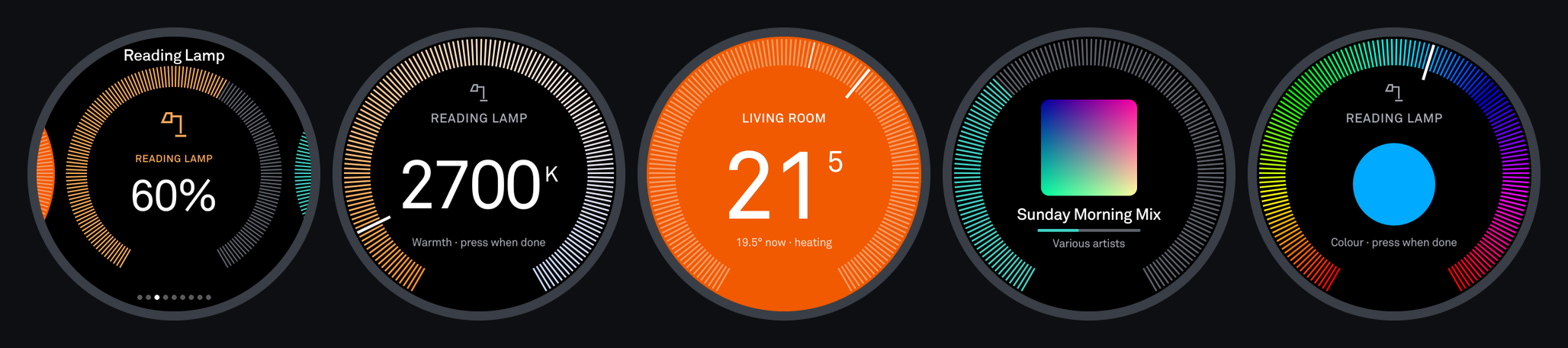
Walk up and your devices show zoomed out around the thermostat. Turn to browse, press to open, and the ring becomes that device's control.
Turn, press, hold
| Where you are | Turn | Press | Hold |
|---|---|---|---|
| The chooser (all the cards, zoomed out) | from card to card | opens the card | puts the screen away |
| An open card | its value: brightness, temperature, volume… | its options menu | its main action: on/off, play/pause, run |
| An options menu | through the options | chooses one |
Nothing is switched or run from the chooser. A press there only ever opens a card, so you can't turn on a light by browsing past it. Once a card is open, a press shows its options and a hold does its main thing.
What you open stays open until you go back with Back in its options. Left alone, the screen times out (after 20 seconds by default, a camera after at least a minute), and the next wake starts again from the top.
Card by card
| Card | Open, turn | Hold | Its options |
|---|---|---|---|
| Light | brightness | on / off | on / off; warmth and colour dials where the light has them; a group's each light |
| Switch, fan | on / off | ||
| Other thermostat | the temperature, as the Nest sets its own | its presets: eco, away… | |
| Speaker | the volume | play / pause | play / pause, previous, next. Album art and progress show on the card. |
| Option (select) | through its options | for example the Nest's hot water boost | |
| Blind, cover | the position | open / close | open, close |
| Scene, script, button | runs it | Run | |
| Face | the action you chose, if any | Back, then up to four actions you choose. See Face cards. | |
| Camera | opening it takes a fresh picture; the latest still fills the round screen | ||
| Alarm | the option, or each digit of the code | arm (its modes), Disarm or Cancel. See Alarm panels. | |
| The thermostat | the target temperature | Eco, heating on or off, hot water boost. See The thermostat and Settings. | |
| Settings | always last. The thermostat's everyday Settings, and Nest's own menus one press further. | ||
Face cards
A card can be a glance face of its own: a clock, the weather, a big number, your next event or a battery, designed like the glance. Add one in the panel's Cards tab (Add a card, then A glance face) and design it on the Glance tab. Each starts as a copy of the glance, and is its own from then on.
- Its options hold actions you choose, up to four after Back: scenes, scripts and buttons run; lights and switches turn on or off.
- A hold can do one of those actions. Without one, a hold does nothing.
Ring limits
Each card with a ring can have a Lowest and Highest: a thermostat's temperature (the Nest's own card too), a speaker's volume, a cover's position, a light's brightness and warmth. Leave them blank to go as far as the device does. Set them on the card in the panel's Cards tab.
- The ring's ends are the limits: a full ring is your highest, an empty ring your lowest. The card says At your limit when you reach one.
- The Nest's commands stay within them. Home Assistant, its app and your automations can still set anything.
- A light group's limits hold for its lights too, unless a light has its own.
- The Nest's own card's limits hold on its card, not on Nest's own dial (if you choose it in Settings) or its schedule.
- Can be pushed past, for each end: a turn stops at the limit first, and the card says Turn again to go past. Turn again: the three arrows light as you go, and after six clicks it goes through. Past the limit the ring stays full (or empty), and the arrows, number and words turn amber.
- A limit that can't be pushed past holds. Opened while the value is already beyond it, the card waits at that end: the number shows grey, and it says which way to turn. The first turn back sets the limit.
Two looks
Everything is drawn in Fledge's own look by default. The Nest's original look is one setting away: Settings → Theme on the thermostat. The Fledge panel in Home Assistant can preview either.
The cards speak the language the Nest is set to in its own settings: English or Dutch, English for any other. After changing the Nest's language, the cards follow once the thermostat restarts. Names from Home Assistant show as you wrote them there.
What the thermostat is allowed to do
Only to the devices you chose, and only: switch a light, switch or fan on or off; set a light's brightness, warmth or colour; set a thermostat's temperature; set a speaker's volume and play or pause it; run a scene, script or button (and a face card's actions); take a camera's picture; arm or disarm an alarm. Anything else it asks for is refused and logged. See Security.